Great video!
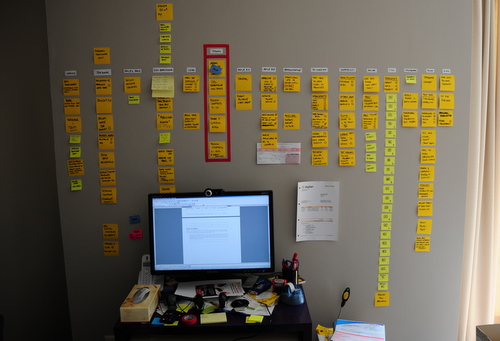
Any similarity between this guy and my desk is purely… frightening. I hope these things don’t start moving on their own!
Using information visualization to manage agile projects
Great video!
Any similarity between this guy and my desk is purely… frightening. I hope these things don’t start moving on their own!
Here are some examples of Kanban boards I built for a friend. I was not coaching these teams, so I did not have any say on the process. My job was simply to build a board that would reflect their current process, using my Visual Management guidelines.
These boards are for a corporate unit that acts as a sort of “enterprise proxy product owner”. They receive business demands from multiple business units, they analyze and classify them, and make a proposal to the customer. They also make recommendations such as build or buy. If the proposal is approved, they send it to development and follow it up into production.
For my first attempt, I was told that there was a special state that had to be highlighted: the “GO/NO GO” state, where a proposal is waiting to be either approved or rejected. So I built this board with a red swimlane to hold kanban cards in that state:
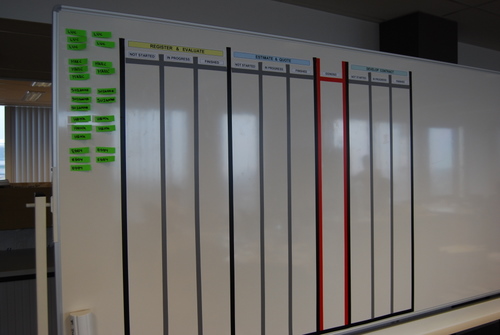
I was very happy with this solution from the visual point of view. Unfortunately they realized that it did not reflect their process accurately so I was asked to tear it down and start over again.
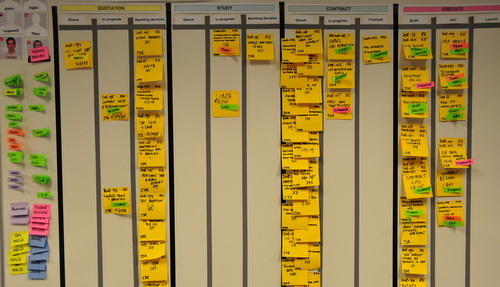
For the next iteration, They identified four states where something vaguely resembling single-piece-flow should theoretically occur. The four states are “quotation” (yellow) , “study” (blue), “contract” (green) and “execute” (red). The colors are the background color I chose as a title for the swimlane to visually distinguish it. For each state, there are three sub-states that are not always the same. This is what a finished board looked like:
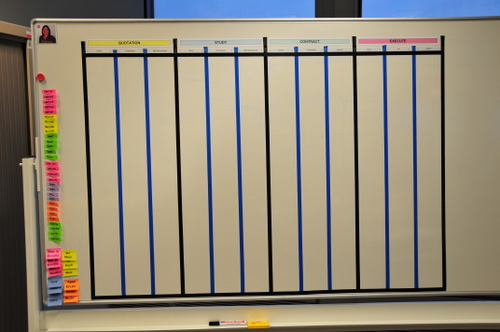
Note that I used different colored tape to indicate internal columns from state-boundary columns. In the first board I had used gray tape, which I like more than the blue tape in this picture because it connotes better the idea of sub-columns.
These boards were accepted and populated with kanban cards. Each card is a Super Sticky Post-It, representing a customer demand as it flows from being submitted by the business to being deployed into production. Note how immediately upon populating the board the bottlenecks became visible. This board represent the initial state this team was in when they decided to visualize their workflow.
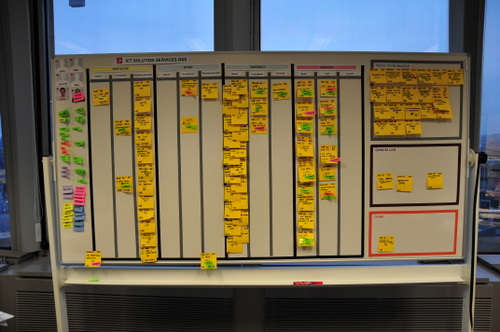
They also put some sections out of the swimlanes for special things. For example jobs that get cancelled or sent back to the business. Those are the boxes you see on the side.
Here is a closeup of the main part of the board.

Good post. I think you need to put limits on your queues as they still count to total WIP and affect Lead and Cycle time.
Pingback from Visualisation + Action = Visual Management « Thinking for a Change on September 21, 2009 at 9:02 am
Pingback from Se hace camino al andar… » Blog Archive » Un tablero kanban en un wiki on November 30, 2009 at 11:26 am

I created a visual kanban board by using a blog site and few lines of code. The sample uses a sharepoint blog, but the code can use any RSS blog.
Hope it helps.

Agree with David, WIP limits are needed there seems to be far too much on the board at the same time.
Pingback from Resources for value stream mapping « kanban.la on July 1, 2011 at 9:26 pm

I’d like to use your photos as examples, Xavier, main problem is the photos are small, can you link them to the originals, if you still have them?
Nice work!

Hi,
The info and pictures are really helpful. With your permission, I would like to use some of the pictures from your site in a project work I am currently doing ? Please advise ?
Cheers,
Shivaji

Hi Shivaji, you can use the pictures if you quote the source.
Regards,
Xavier
4 comments
I am interested in your system posted at your desk. Could you explain it a little further to me.
Excellent video. Your post-it arrangement is very aesthetically pleasing, but I have to ask you this: how can you work on such a tiny desk? Seems crazy
Haha.. who said I can? I just went to IKEA last week and I have a new desk waiting to be assembled. This was an emergency desk that a friend lent me.
Hi Tim!
Thanks for your interest. I will try to publish a blog post about it soon. I need to figure out some details first, as I am experimenting with it. I’ll let you know when I write something up.
Xavier