Status Tags and the Three Columns

“Less is more”. You heard this before, right?

This applies particularly to visual management. It is very easy to generate noise by creating visual elements that are not strictly necessary. When designing our information radiators, we should always be careful not to create waste. And any visual element that doesn’t add value is waste.

Of course, sometimes it’s not that easy to figure it out. For example: suppose you run out of yellow Post-it’s, and you see some green Post-it’s lying around. Should you use them, or is this waste?waste

By using another color, you are creating “something”. There used to be one color, now there are two. People will look at the board and wonder: “What does green stand for? What’s the difference between green and yellow?”. And there is none, you were simply out of yellow. So in this situation, using green is waste. You are also killing off your possibilities of giving green a specific meaning in the future, which you might will need.

But on to status tags and the three columns, the main topic of this post. It’s time to design your taskboard, and you have to decide the most basic of things: how many colums do I make, and what do I call them?

If you are doing Scrum, and you agreed with One Day Tasks, you will probably be tracking the flow of tasks (not stories) across your board.

What’s the simplest solution that will work?

A unit of work can have three basic states: “Not Started”, “In Progress”, and “Finished”. Most taskboards that have more than three columns are breaking up “In Progress” into intermediate, sequential phases. Typical example: “To Validate”.

There are many reasons why I would try to avoid using additional columns. It promotes specialization and local optimization. It creates two processes and a buffer where there could be a cell and single piece flow. It’s waterfallish.

But the most important reason -from the visual management perspective- is that it creates extra visual elements (more columns). It also uses more taskboard real estate, which can be scarce. All this is waste.

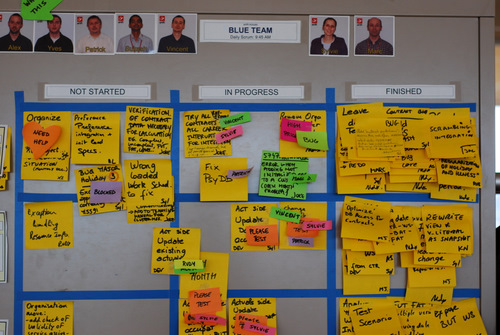
Blue team board

A good way to eliminate the need for extra columns is to use status tags.  For example, instead of adding a “To Validate” column, we can solve the same problem with a PLEASE TEST status tag that you stick on the task. Practically any sub-state of “In Progress” can be represented by these status tags; which are smaller, less intrusive and more flexible visual elements than columns. They are also color-coded which makes them even more powerful from the visual perspective.

So unless you’re into Kanban and you really know what you’re doing, I highly recommend you stick to the basic 3 columns. (And we’ll discuss Kanban another day, because I think status tags and the 3 columns might also be applicable there. For example, you can limit work in progress by limiting the number of available status tags.)

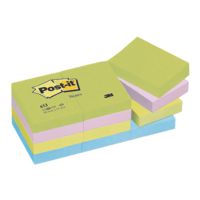
Status tagsThe Post-it’s I use for status tags are product number 653, 51 x 38 mm in size. I use two different color sets, that gives you around 6 total usable colors (there is some overlap between sets). I also put a very small piece of Scotch Magic tape on the top, because they are not Super Sticky.

The status tags I use will be discussed individually in separate posts.

8 comments

Dadi's avatar
Dadi on May 25, 2009 at 4:23 pm

Hi Xavier,

What do you mean when you put status tags on _tasks_? ‘Please test’ that the portion of the story that I finished by doing the task works?

Really great stuff your doing on this site!

Regards,
Daði.

Xavier Quesada Allue's avatar
Xavier Quesada Allue on June 4, 2009 at 12:08 pm

Hi Dadi,
In the examples I show, a task represents a piece of work the team has identified as necessary to complete a Story. “Please Test” on task level thus means that a certain team member wants another team member to review or validate whatever work was done to complete the task. It is an internal team signal, that should normally trigger a conversation between the person who completed the task and whoever will validate it. If the story was broken up into tasks that are indivudually testeable (for example, maybe steps in a workflow) then Please Test could very well mean what you wrote. But it is not always feasible to break up a story into individually testeable tasks. So a Please Test tag could also mean “please review my code” or “please review my design”… it’s all up to the team, the project they are working on and how they decide to approach it. The important thing is giving the team a visual flag they can use to indicate they want a piece of work reviewed by someone else within the team, thus eliminating the need of a “Validate” column.

Regards,
Xavier

Marcelo's avatar
Marcelo on July 29, 2009 at 1:57 pm

Xavier, como estás. La verdad que pasó mucho tiempo desde que me enteré tu block, hasta que pude dedicar unos minutos a leerlo.
Finalmente, me lo deboré, no podía parar de leerlo.
Gracias por las ideas, muchas ya las estoy aplicando hace un tiempo, y muchas otras las voy a tratar de probar para ver como me funcionan.
abrazo.

Xavier Quesada Allue's avatar
Xavier Quesada Allue on July 29, 2009 at 2:25 pm

Gracias Marcelo, un abrazo.
Xavier

Pingback from Visual Management Blog · Daily Scrum against the board on August 5, 2009 at 9:03 am

Metin Gucer's avatar
Metin Gucer on December 18, 2009 at 2:37 pm

Hi Xavier,

I really liked your ideas on your web site. However, I had to disagree with your approach on this case. Having status tags can also cause losing some information from your scrum. During the scrum process, I also like to see the number of tasks needs to be tested and also number of bugs found for each task. Status tags could be removed from the task and at the end of the sprint, some measurement points could be missing.

Regards,

Cesar's avatar
Cesar on May 4, 2012 at 10:37 pm

Hola Xavier, muy interesante tu blog! estoy aprendiendo mucho leyendo tus articulos y ahora voy a comenzar a implementar Scrum por primera vez en la empresa en la que trabajo.

Creo que he entendido bien todos los elementos del Scrumboard, excepto uno. Bajo que criterio se dividen las tareas en filas? En las fotos que colocas siempre hay 3 columnas (esto si lo entiendo) y 5 ó 6 filas. Si pudieras darme un ejemplo por favor.

Gracias
P.D. Puedes responder en ingles, no hay problema.

Xavier Quesada Allue's avatar
Xavier Quesada Allue on May 5, 2012 at 9:38 am

Hola Cesar, las filas son historias de usuario. Cada historia de usuario a su vez se divide en tareas. Para más informacion te recomiendo leer el libro “Scrum y XP desde las trincheras” de Henrik Kniberg. Xavier

One day tasks

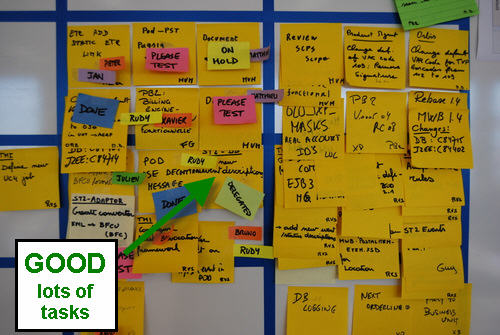
One day tasks are tasks that take -in theory- up to one day to complete by one person, or by a pair of people in the case of pair programming. Creating tasks of one day maximum size gives two benefits to the team. The first is that under normal conditions it creates visible daily flow. Meaning that if nothing goes wrong, one task will be finished (on average) per team member per day. So if a team has 8 members, theoretically they should finish 8 tasks per day. But in Agile teams, people work in pairs a lot, either pair programming, or a coder/analyst-tester pair, so in practice it should be around half of that that gets finished. And effectively, my experience is that in healthy 8-member teams, you should expect to see around 4 DONE tags per day.

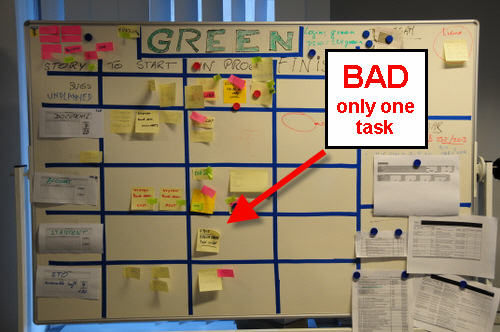
Without one day tasks, you will end up with a story with only one or two Post-its, where nothing ever moves and during the daily Scrum a team member says “I’m still working on this… yep… still some work to do, still working on it.”

BAD: Only one task

The other advantage of having one-day tasks is that it is great way to see if the team has really analyzed the story or not. Sprint planning blues? Having one day tasks forces the team to think about what they really have to do to finish that story, to a good level of granularity that is later on easy to follow up. The big effort is not in writing the Post-its, it’s in thinking what has to be done in those 1-day chunks.

GOOD: Lots of tasks

10 comments

Tobias Mayer's avatar
Tobias Mayer on February 17, 2009 at 5:18 am

I am an advocate of tasks being one day or less. Often times they are much smaller, so in my experience a team gets around 5-20 tasks done per day. As you say the visual flow is important, and stagnant boards provide no useful information. Keeping tasks small also means we can avoid the Scrum-suggested concept of tracking hours, which to my mind borders on micro-management. Tracking at the task level is much more useful. And simpler. A task is done or not done. It is binary.

From a business perspective tracking at the story level is even more useful. The story is the smallest unit of business value, and business people should not be concerning themselves with tasks: those are solely in the domain of the development team.

One last point about having few tasks. I find this acceptable if the story is not immediately ready to be worked on. I have worked with teams who prefer to task out in a just-in-time way, and that works in some contexts. I always insist though that each story has at least one task, even if it just says “create tasks”.

Joserra's avatar
Joserra on February 19, 2009 at 9:05 am

We have another problem with this. We have 60 user stories to be implemetned in one iteraiotn, everyone with 5 or 6 tasks… We just simply do not have enough space for all :)

Tobias Mayer's avatar
Tobias Mayer on February 21, 2009 at 11:15 am

60 stories in one sprint? I’d be interested to know the size of the team and the length of the sprint. Is this normal for your team, and do they always meet such a commitment?

Joserra's avatar
Joserra on February 22, 2009 at 11:50 pm

Hi Tobias,
Our team is 14 people, and the length of the sprint 3 weeks. Bus stories are quite short, maybe we have to work more on their definition.

Xavier Quesada Allue's avatar
Xavier Quesada Allue on February 23, 2009 at 4:38 pm

Hi Jose,
You’ve probably read before that the ideal team size ranges from 5 to 9 people, with a sweetspot in 7. You might want to look into breaking your current team into two sub-teams and making two task boards. As you suggested yourself, I would also work with the Product Owner towards defining larger stories. He must be going crazy keeping track of 60 stories per sprint!

Regardless of how you size your team and your stories, if you ever find yourself having more stories than fit in the board, try to limit the work in progress to the number of stories that actually fit, and as they are finished during the sprint, you put them on the side and pull in a new story into the board. The boards I show in the pictures normally allow for 6 simultaneous stories, which should be more than enough, even for extra-large teams.

Pingback from Visual Management Blog · The DONE tag on March 9, 2009 at 8:14 pm

David Moles's avatar
David Moles on April 15, 2009 at 12:38 pm

Hey, Xavier —

Do you see any value in tasks smaller than a day? We tend to task things in hours, more or less, for capacity planning purposes (x developers * 12 dev days / sprint * 6 dev hours / day = y hours), but after seeing a David Anderson kanban talk I’ve been wondering whether the extra granularity’s really adding much. It’s a useful way to make sure you don’t forget anything someone thought of during the planning meeting, but that could just as well be done with sub-task bullet points…

Xavier Quesada Allue's avatar
Xavier Quesada Allue on April 15, 2009 at 12:52 pm

Hi David,

I think you should definitively aim for one day tasks if you can and if it is feasible for your team. Tasks of one day seem to be the sweetspot between being able to visualize flow, and keeping granularity as big as possible so as to have the least administrative overhead. Smaller tasks can be a pain to keep track of. For a lot of people it’s just not worth it, and if you can get away without it, there is nothing to lose. But the key issue here is -as you said- not forgetting about stuff because your granularity is too big. Each team has to figure this out for themselves and their situation. The size limits guidelines are: not bigger than one day so as to see flow, and not so small that people start complaining about the administrative overhead (or worse, stop respecting the tasks and updating the board).

Pingback from One day tasks - I do not like anymore on August 21, 2009 at 3:53 pm

argyn's avatar
argyn on February 26, 2011 at 9:26 pm

let’s say my ability to estimate the task’s difficulty/length in hours is inversely proportional to the length of a task, i.e. longer is the task – harder to estimate its correct length. in this case we could assume that estimation error is from Poisson distribution: if L – correct length of a task, then estimation error’s std deviation is sqrt(L).

let’s split the task into N smaller tasks, then estimation error of each smaller task is sqrt(L/N) and its correct length is L/N. simple math will show that estimation error of sum of tasks is sqrt(L) and the mean is L. what does this mean? it means that we gained nothing in terms of precision of task estimation by dividing it into smaller tasks, given that estimation error belongs to Poisson distribution.

what if our ability to estimate difficulty of bigger tasks is the same as smaller ones in relative terms? let’s assume that estimation error belongs to Gaussian distribution, and that ratio of std deviation to mean is the same for larger and smaller tasks: r = sig / L, where sig – std deviation of estimate, L – length of the task. again, we split the longer task into N smaller ones. each small task has L/N length, and sig/N error. if we aggregate the tasks, we get a big task’s mean L, but the error is sig/sqrt(N), i.e. in relative terms we’ve got reduced error or larger task estimation by factor of 1/sqrt(N). what does this mean? it means that if our ability to estimate difficulty of a task in relative terms doesn’t depend on the size of the task, then it’s better to split larger tasks into smaller pieces for project planning purposes given that the error belongs to Gaussian distribution.

if you look at these two examples, then you get a strange feeling that usual arguments for smaller tasks are completely reversed. you better split a task into smaller pieces not when you’re better at estimating smaller task length.

now, let’s add another tweak to the argument – a little bit of behavioral aspect. what if our task effort estimates are not mean? in other words if i think that the task is going to take me 8-10 hours to complete, will i estimate it at 8, 9 or 10? it probably depends on the team spirit, but i bet in most places you’ll get 10 as an estimate, conservative estimate it is.

let’s assume that my estimate will be L+std deviation of error. in other words, in first example my big task estimate would be L+sqrt(L), and my small task estimates would be L/N+sqrt(L/N). aggregating small tasks into a big one we get L+sqrt(LN), in other words i’ll overestimate the big task.

in the second example, i’ll get L+sig for big task estimate, and (L+sig)/N for small task estimates. aggregating small tasks, we get big task estimate of L+sig, i.e. the same mean.

what did we learn now? if the task length estimates are conservative, then splitting larger tasks into smaller ones leads to better precision in effort estimation only if we’re as equally good at effort estimations for smaller or larger tasks. if we estimate smaller task efforts better in relative terms, then by splitting into smaller tasks we may overestimate the task length consistently under certain assumptions.

assumptions are very important, that’s the main point. in this case the assumptions were about effort estimation error distributions. therefore, without experimental study of the distributions, it’s impossible to make recommendations on one-day tasks at least with regards to task effort overestimation issue

Introducing the Visual Management Blog, a space for the discussion of ideas and examples of Visual Management applied to Agile teams and project management.

What is Visual Management?

Visual Management is the practice of using information visualization techniques to manage work. A simple example is using sticky notes on a wall to manage a list of tasks, a better (and more complex) example is kanban. Many visual management ideas come from traditional Lean thinking and Toyota, but these techniques are also very popular within the Agile Software Development community.

Benefits of Visual Management

Visual management is generally regarded as a clear, simple and effective way to organize and present work . It can also be perceived as fun, since visual elements bring color and life into an otherwise boring office environment. Another benefit of visual management -often overlooked- is that it can positively influence the behavior and attitude of team members, managers and stakeholders. How? For example, by helping build transparency and trust.

Information Radiators and Visual Management

red lava lamp

“Information Radiator” is a popular term invented by Alistair Cockburn that is used to describe any artifact that conveys project information and is publicly displayed in the workspace or surroundings. Information radiators are very popular in the Agile world, and they are an essential component of visual management. Most Agile teams recognize the value of information radiators and implement them to some degree in their processes. The three most popular information radiators are Task Boards, Big Visible Charts (which includes burndowns and family) and Continuous Integration build health indicators (including lava lamps and stolen street lights). In this article I will focus on task boards, since I find them the most critical and least discussed information radiator.

Task Boards

The most important information radiator in visual management is the Task Board. (When doing Scrum, I sometimes call task boards Scrumboards). The task board has the mission of visually representing the work that is being done by the team. They are the most complex and versatile artifact: a physical task board is a “living” entity that has to be manually maintained.  I believe boards are being undervalued by most agile teams today. This might be because there has not been a lot of focus on their potential, or perhaps there are simply not many examples around on what makes a great task board. In any case, it’s time to take task boards to the next level. [1]

What makes a great Task Board?

A good task board should be carefully designed with readability and usability in mind, and the project methodology should actively rely on it. This implies that the use of the task board should be standardized and form part of the process. If task boards (and other information radiators) are not an integral part of the project methodology, maintaining them might be perceived as overhead or duplication of work. This results in boards not being updated and becoming out of sync with the work actually being done. An incomplete or stale task board is worthless. A task board is a living entity and should be kept healthy.
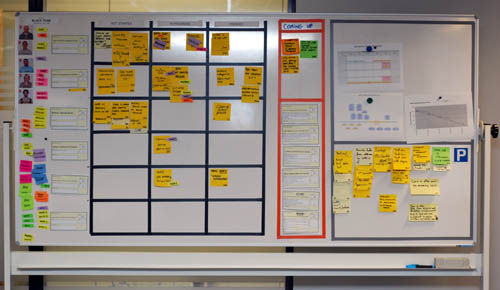
scrum task board

You have a great task board if…

  • Team members never complain about having to use it.
  • The daily standup happens against it.
  • Random people that pass by stop to look at it, expressing interest and curiosity.
  • Your boss has proudly shown it to his boss.
  • You see team members updating it regularly during the day.
  • It passes the hallway usability test: a person who has never seen it before can understand it quickly and without explanations.
  • You catch a senior manager walking the floor and looking at it.
  • It just looks great!

Visualizing waste

When designing the process to be used with the task board, two important factors should be taken into account: the first is how to visualize work that is not directly associated with the value-added activities being performed (i.e. in Scrum, tasks that do not belong to any story within the current sprint). Visualizing waste can sometimes be as important as visualizing value-added activities. So it is desirable to come up with a system that will visualize any work being performed. As an example on how to achieve this, I dedicate the top row of each board to “Unplanned items and legacy issues”, a placeholder for any task that does not belong to a current story. Bugs that come up (belonging to stories already delivered) go there, random tasks (e.g. “reinstall Windows”) too.

Work granularity

The second important factor is the level of granularity we will visualize. In my experience the ideal size of tasks is one day. (This is only a guideline and should be taken as such. As long as the average task size is around a day, you should be OK.) The goal is to see regular flow on a daily basis. Sometimes people don’t see the benefits of having 1-day tasks and go for much bigger lenghts. It seems difficult to achieve the benefits of visual management with work units of that size. The granularity is simply too big; not enough movement will be seen, not enough detail will be shown.

Aesthetics and Usability

Most task boards are set up without giving too much thought to aesthetics and usability.  They are hastily made, using available materials and without putting much attention to detail. As an example, in many boards columns are hand drawn with whiteboard marker, and tasks written in ballpoint pen or pencil on whatever material is available (large post-it, small post-it, index card, etc). There are no guidelines regarding the use of colors or materials, and no defined process for using the board. All this makes for very low readability and poor usability in general. If you are standing two meters from such a board, it looks sloppy and is rather illegible. With some effort, we can clearly do better than that!
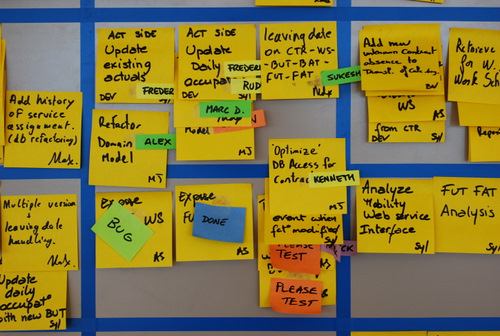
blue_detail

I would like to emphasize the value of task board design and usability, and of implementing a standardized process regarding how to use it (which implies using standardized materials). This has really been a key success factor for me, helping me smoothly introduce Scrum to new teams that were at the Shu level.

I will be publishing illustrated examples of the task board best practices I have gathered over time in the series Elements of  taskboard design.

Results of applying Visual Management

In my experience, quality information radiators can become central to an Agile software development process for co-located teams. Most daily activities revolve around the task board. The burndown and backlog show project status at a glance. Build health is clearly displayed. In many cases good task boards result in teams not needing a bug tracking system anymore. Managers are at ease. Product owners claim to be able to sniff trouble coming up immediately, by visualizing trends on the boards. And the most important result: increased transparency and trust created among all parties.

Effect on team members

The main effect I observe among team members is increased accountability. High visibility and clear guidelines ensure team members cannot hide work (or non-work) from each other. This tends to expose things, but it is done with ground rules that people find quite reasonable. Thus accountability is achieved in a smooth way. This builds transparency among team members, which in turn builds trust.

This is also a good way for team members to learn to define and select their own work instead of having work assigned to them. Many transitioning teams struggle with this step, especially since it might imply a loss of perceived authority by the former manager or team lead.

Behavioral changes in Management

Project management and the Product Owner might perceive a decrease in risk: all work being clearly visible, there is less chance of issues going undetected and of people slacking off, and it is easy to keep track of progress.

Another benefit for people in positions of responsibility is that they can obtain the peace of mind sensation they would theoretically get from “micromanaging” a team, without any of the drawbacks.  They know that at any moment, if they would want to, they can go and see exactly what everybody is doing and the status of every work item, to any desired level of detail, with zero overhead and without causing any discomfort to anyone. The goal here is that managers, whenever they feel that need for control tickling them, will go to the task board instead of to the team members. This is especially good for enabling teams transitioning to Agile to self-manage.

Appendix: Lean / Kanban development and Visual Management

Visual management is an important part of Lean. As I mentioned in the introductory paragraph, there are several examples within the Lean literature on using visual tools in production or factory settings. These ideas also extend to Lean Product Development [2], but there are not that many examples or pictures out there.  The Kanban development movement -which is a relatively frontier area at the moment-  explicitly takes a visual approach to managing work, and everything I have seen features strong visual management aspects. But, understandably, most of the focus of Kanban at this point is being put on describing the more important Lean aspects of the methodology such as cycle time, single piece flow, limiting to capacity, etc. and not on usability or design of the boards themselves. I hope this article will help introduce some ideas on task board best practices to the Lean/Kanban movement, since they already have a strong bias towards visual management.
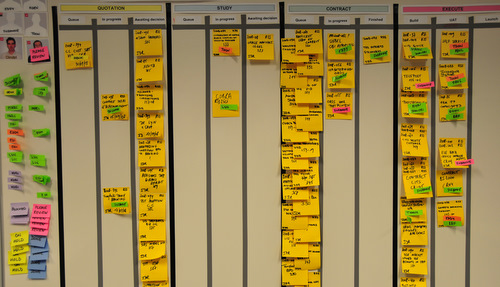
kanban board

Footnotes

[1] Researching this article, I found a very good post specifically focused on task boards, but it is mostly introductory and surveyal: Tom Perry’s Task Boards: telling a compelling story . There is also a great article out there that comes from a Lean practitioner and is very similar in spirit to what I wrote here (including what I consider a very nice -albeit simple- board): Visual Management and Self-Reliance by Peter Abilla. BTW, this guy also interviewed Mary Poppendieck! Coincidence?

Some other articles touching the subject:

[2] Morgan/Liker in “The Toyota Product Development System” dedicate a paragraph (page 262) to Visual Management when describing the obeya room, saying “Visual management is key to effective communication[…]”. Mary and Tom also talk about the importance of the “Visual Workplace” in one of their books.

40 comments

Tobias Mayer's avatar
Tobias Mayer on February 17, 2009 at 5:10 am

Nice article Xavier. I really like the emphasis on clear, readable, well-understood task boards. It seems that visual management is a real skill that teams need to learn. Some people have this skill naturally, but apparently many do not. Too many times I have seen task boards that I simply do not understand — sometimes even after an explanation. Such tools are next to useless.

I like the “the hallway usability test” and will recommend that to teams and CSMs on my training and coaching engagements. Thanks for that.

Rachel Davies's avatar
Rachel Davies on February 18, 2009 at 12:56 am

Glad you started this blog – it’s an important topic!

I created a site http://www.informativeworkspace.org/ a few years ago. It has some photos of team boards although looks a bit dated now.

Stacia's avatar
Stacia on February 18, 2009 at 6:50 am

Xavier, I am so excited to see you take this information and present it so nicely! I was so thrilled to see your taskboards at Agile 08, and you are doing a great service to the community by teaching others how to utilize visual management in creative, useful ways! Keep it up!

Pingback from Visual Management Blog « Paircoaching’s Weblog on February 18, 2009 at 4:05 pm

Adrian Eidelman's avatar
Adrian Eidelman on February 19, 2009 at 5:44 am

Muy buen artículo Xavier. Tuve la oportunidad de ver las fotos de tu lugar de trabajo durante Ágiles2008, me alegro que ahora las publiques junto con buenos consejos de cómo mejorar ese aspecto. Gracias!

Pingback from Agile Thoughts » Blog Archive » Agile2009 — Submission Time on February 21, 2009 at 11:39 am

Diego Fontdevila's avatar
Diego Fontdevila on February 23, 2009 at 5:18 am

Excelente, estoy de acuerdo en la importancia de la calidad visual de nuestras herramientas. Gracias por ayudar a desarrollar esas habilidades. Espero los próximos artículos de Elements…

Peter's avatar
Peter on February 24, 2009 at 11:27 pm

Hi,
Xavier, very nice contribution! I am proud to add a recent experience, hoping to confirm the effects of visual management.

A manager was impressed daily when passing by his developers team. Only it took us a couple of weeks to notice that he was always looking the sprint burn down instead of trying to understand the visual dynamics of the user stories & tasks moving over the whiteboard. Effect: the team stopped creating tasks, even when they were aware of extra needs to be done, as these negatively influenced the sprint burn down, and so they prevented the manager to be unfriendly that day. In a first phase they just realized these needs without notifying, but later more and more tasks were not done any more…

Patrick Debois's avatar
Patrick Debois on February 27, 2009 at 5:09 pm

Hi Xavier, as you know i’m also found of making things visual. We discussed it a bit at the Agile Open Belgium and i have some suggestions for you.
* it would be useful to create a kind of visualization patterns: by this I mean that having a kind matrix with the variables/information type you want to show with possible visualizations. F.i. speed of your development: burndown, velocity charts. Mood of the team: glad, sad, mad
* don’t forget there are more senses then only the visual. F.i. speaking out loud on the daily standup is important and appeals to the Auditive part. And not everyone is strong on Visual stuff.
* as someone pointed out to me: the term visual management might have a control connotation. It is about bringing visible, you might want management to see it , but your most important client is the team itself.

Tobias Mayer's avatar
Tobias Mayer on February 28, 2009 at 9:11 pm

to the last comment… “you might want management to see it , but your most important client is the team itself.” this depends very much on the type of visual tool. Certainly a sprint taskboard is for the team, but a manager/PO will be interested in the rate the stories are hitting the Done column, and certainly interested in anything that represents a release plan. Horses for courses :-)

Kathy Weippert's avatar
Kathy Weippert on March 31, 2009 at 7:02 pm

I really enjoyed the article and ideas presented. However, I am having a problem applying the 5S (6S) methodology to examples of the taskboards seen. I like the idea of using the visual management taskboards, but I find that they often become cluttered and not maintained in a fluid manner. Unfortunately, I have not seen a taskboard to date that applies the 5S rules.

Xavier Quesada Allue's avatar
Xavier Quesada Allue on April 10, 2009 at 3:43 pm

Hi Kathy, thanks for your comment! You got me thinking about 5S and how it applies (or not) to the type of work these taskboards are meant to visualize. I will try to write about it in the near future, but first I need to investigate and understand 5S correctly. We do not seem to talk much about 5S in the Lean/Agile software development community.

Blair R's avatar
Blair R on May 14, 2009 at 9:21 pm

I use task boards/agile practices for non-software projects. I am usually managing multiples projects or a programme of work. Some are my own projects others I have teams to manage.

Would you recommend a taskboard for each project? If so, how would that look on paper/whiteboard? A merged board or lots of huge A1 sized task boards?

Also, what do you do with features in future iterations? A task board is usually for on iteration right? Do you list them or do you have cards/post its stored somewhere?

Thanks everyone.

Esmeralda's avatar
Esmeralda on July 6, 2009 at 8:59 pm

Very nice article Xavier, thank you for sharing your experience.
I’d opportunities to apply Visual Management and as you say I’ve seen the benefits: transparency, trust, self-management , decreased risk, speed in communications. The emphasis you make on having good design practices for the board is key.
Best regards.

Pingback from Visual Management Blog · Readability and the Thick Black Marker on July 15, 2009 at 4:16 pm

Pingback from The Heart of Scrum « Agile Anarchy on August 3, 2009 at 6:07 am

Pingback from Tales from the Scrum: El corazón de Scrum - Angel "Java" Lopez on August 18, 2009 at 10:21 am

Troy Swinehart's avatar
Troy Swinehart on February 14, 2010 at 1:54 pm

Xavier…thank you! We are beginning our journey to visual management and lean product development. This article has been very useful…more pictures please and keep the ideas coming.

Dudley's avatar
Dudley on February 15, 2010 at 4:25 pm

great piece, but should i actually want to hire you for your expertise, how do you expect me to contact you?

Met vriendelijke groet,

Dudley Esajas
Recruitment Manager

Caesar Groep
tel 030 – 240 68 99
mob 06 – 46234368
d.esajas@caesar.nl

Xavier Quesada Allue's avatar
Xavier Quesada Allue on February 15, 2010 at 9:30 pm

Thanks Dudley. I see you found how to contact me by now… but for the record, my contact information is in the “About the blog” section that you can access from the side bar.

Syed Niaz's avatar
Syed Niaz on March 23, 2010 at 12:22 pm

lovely article, very crisp and well presented, thanks a lot

Patrick's avatar
Patrick on May 22, 2010 at 8:05 pm

Hi Xavier,

Very nice article. Thank you for sharing your insights.
I am working together with another company based in the Netherlands.
It is called TnP Visual Solutions. They are specialised in visual management for all sorts of things. Check the website http://www.visualworkplace.nl for some ideas. Any plans on visual management activities in Belgium ?

Regards, Patrick

yosi's avatar
yosi on September 5, 2010 at 9:56 am

hai…it is a very good article…I have many to learn about scrum and at the right time I found your blog..you’re very much helping me to learn it.

Pingback from Scrum Tracking Tools « Silvana Wasitova, Global Projects Manager on November 10, 2010 at 11:19 pm

Pingback from The 12 days of (Scrum) Christmas « Agile Experience on December 16, 2010 at 11:11 pm

Pingback from Visual Management for Agile Teams « The IT Blog on April 15, 2011 at 10:51 pm

Doug's avatar
Doug on June 8, 2011 at 8:35 pm

Great post….

Make it visible.

Zia's avatar
Zia on June 14, 2011 at 6:06 pm

The VM is suitable format for factory settings where holding formal meetings would not be effective. So the workers standing in a corner can talks about the problems they experienced with their individual machines and tools. They can also talk about their good work e.g. produced more widgets today…

The VM may also be helpful for call centres operations where hundreds of call are received on problems of varying in nature. Individual teams can share their experiences and exchange views on how they handled the calls or how others would responds to certain situations.

The VM is of no particular use in IT teams supporting IT systems with usual types of problems. Nor is it suitable for stable office environment where people do the same thing day in day out.

Zia's avatar
Zia on June 14, 2011 at 6:14 pm

While yellow sticky displays on a cardboard may be acceptable to small low key production offices, it won’t be suitable for teams managing million dollar projects. Due to unstructured and mediocre nature, the PMI for one will never endorse it as one format for executing projects.

Frank Lange (Theory of Constraints)'s avatar
Frank Lange (Theory of Constraints) on September 24, 2011 at 10:59 pm

Realy brilliant article, but I did not agree with the ideas you made in the first sentence. Could you please explain it again? Thank you@Regards Frank

Pingback from Agile2009 — Submission Time | The Agile Radar on January 16, 2012 at 3:09 pm

David Jugo's avatar
David Jugo on February 20, 2012 at 12:28 pm

It’s arduous to find knowledgeable individuals on this subject, however you sound like you realize what you’re speaking about! Thanks

Avisi's avatar
Avisi on March 22, 2012 at 11:23 am

Information radiators are an important and maybe even a must for every (IT) company.

We build our own radiator on top of Jira, Confluence, Nagios, Jenkins, Google Calendar and it also shows us some Tweets.

http://blog.avisi.nl/2012/03/21/building-an-information-radiator-part-i-introduction/

Xavier Quesada Allue's avatar
Xavier Quesada Allue on March 22, 2012 at 12:57 pm

Looks nice!

Pingback from Daily (stand-up) status meeting = GIFTS | Technology One Unplugged. on December 17, 2014 at 3:29 pm